

How Long Does Core Update Recovery Actually Take?

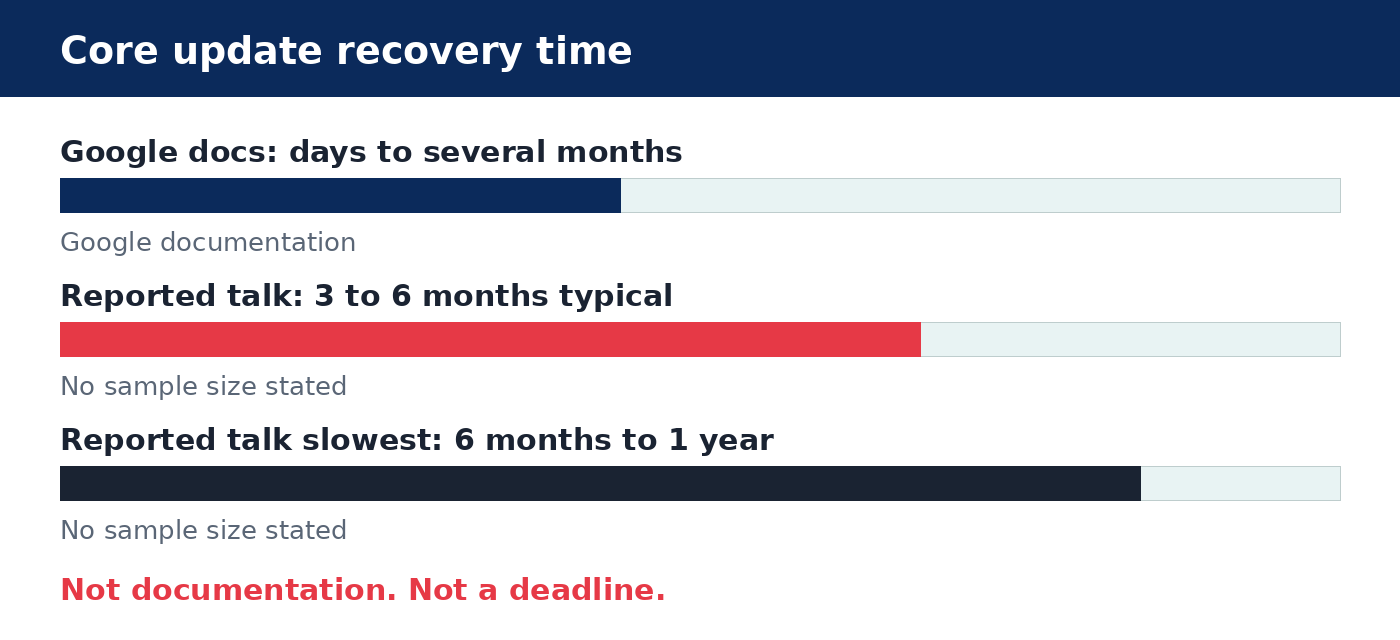
How long does core update recovery take? Google documentation says some changes can show in a few days, while site level confirmation can take several months. The reported range is typically 3 to 6 months, with no sample size stated. It is not documentation or a deadline, and the window depends on fix date, reassessment timing, and fall size.
A drop after a core update leaves you with no date to give your team. This article gives you a clock to fill in, a way to judge recovery, and honest limits.
How long does core update recovery take? The short answer, with the qualifier
A core update is a broad change to how Google systems assess content overall. Google documentation does not give one recovery time for it. It says some changes can show in a few days, while site level confirmation can take several months.
The reported range comes from a conference talk, not from Google documentation. At a Google event in Barcelona on 2 October 2026, Gary Illyes presented timing ranges from internal analysis, as recorded by attendees. The reported range was typically 3 to 6 months, and 6 months to 1 year at the slowest end.
No sample size, measurement period, or definition of typical was stated. Treat the range as a reported reference point, not documentation and not a deadline.
| Source | Timing wording | Status |
|---|---|---|
| Google documentation | Days to several months | Documentation, no single figure |
| Reported conference talk | 3 to 6 months typical, 6 months to 1 year slowest | Reported, no sample size stated, not documentation, not a deadline |
No recovery rate study with a sample size and a date was found in this research. See the step by step core update recovery guide and the diagnostic checklist.
Why one number misleads: the three clocks
Reassessment means Google systems read your changed pages again and judge the site as a whole. Rollout means the period when a core update is applied, from its Dashboard start date to its end date. One number hides three separate waits.
- Clock 1: smaller updates. Smaller core updates run continually between major updates. Improved content can gain position during a gap between major updates.
- Clock 2: major updates. Major updates are the clearest reassessment moments. Site level confirmation can still take several months.
- Clock 3: site confirmation. Some changes can show in days. Confirmation for the site as a whole takes longer.
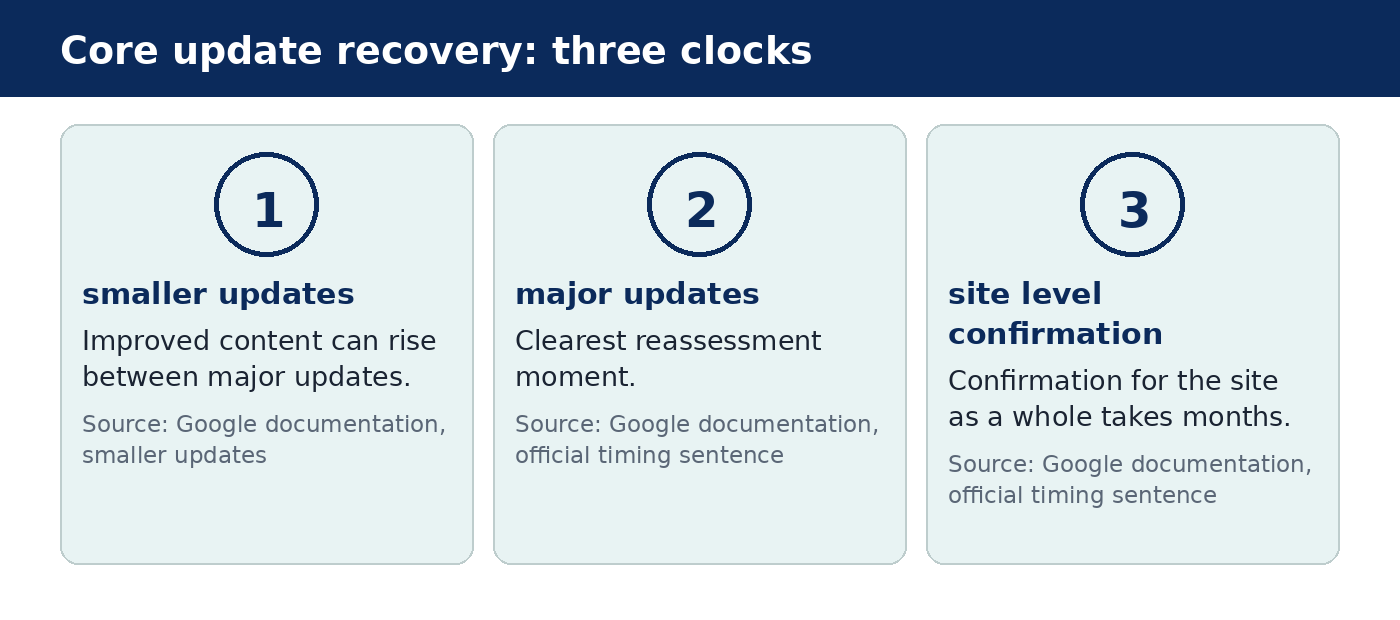
The clocks stack: recrawl delay, reassessment wait, and rollout length add together. Any combined total here is article arithmetic, not a Google figure.
December 2025 lasted 18 days and 1 hour 35 minutes. March 2026 lasted 12 days and 4 hours. May 2026 lasted 11 days and 21 hours.
The range from March 2024 to May 2026 was 6 days to 45 days. It came from a secondary tabulation corroborated by other tabulations. December 2025 onward was recomputed directly from Dashboard timestamps.
Some pages state, in absolute terms, that recovery waits for the next major update. That absolute claim conflicts with the smaller updates wording, which allows improved content to gain position between major updates. The absolute claim is not followed here.
Wait and keep improving are both true. Do not thrash the site with cosmetic changes.
Do not treat waiting as doing nothing. Genuine improvements are the input the next reassessment reads.
Confirm it was the core update before you count time
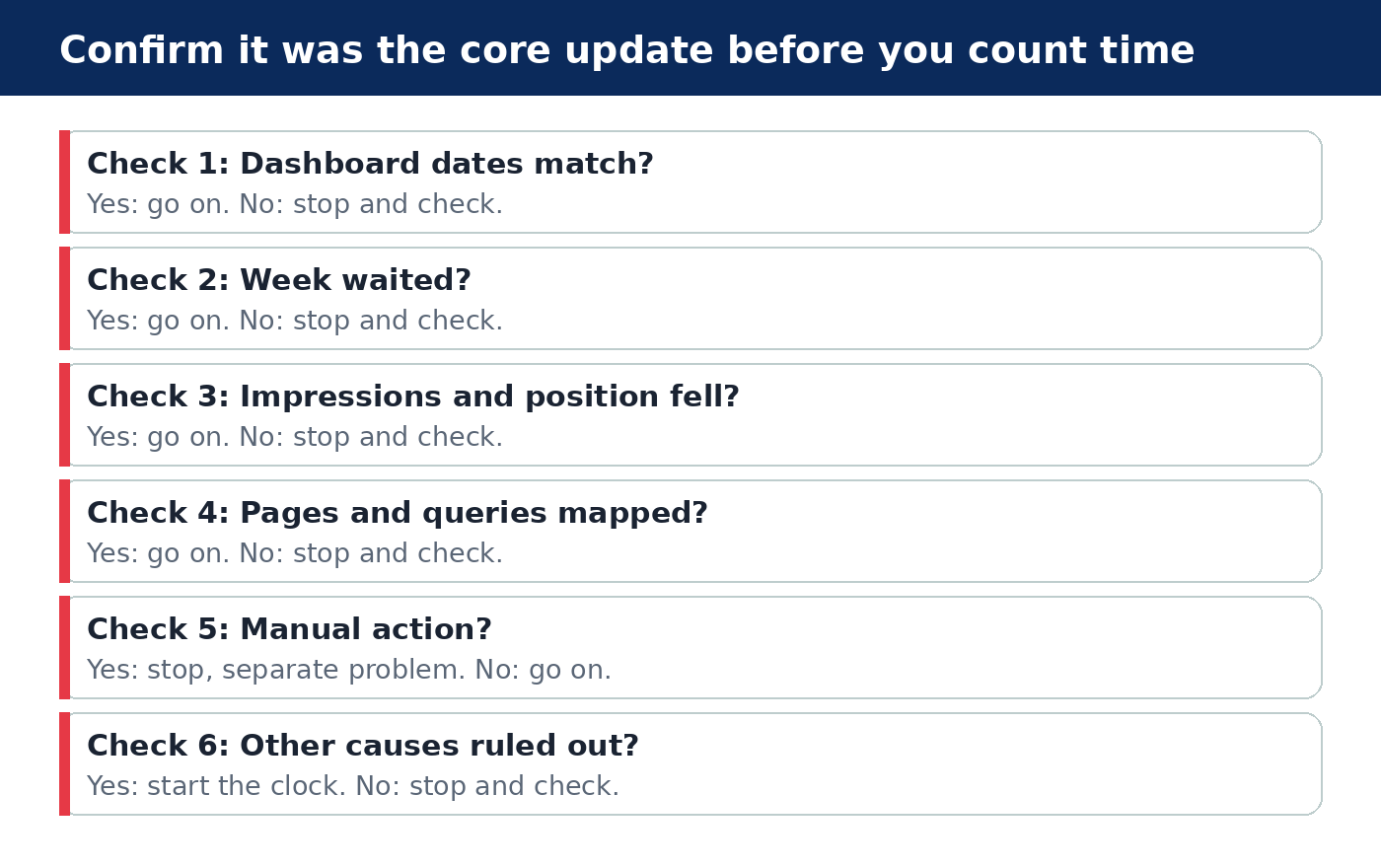
A clock counted from the wrong cause counts the wrong wait. Run these checks in order, and do not start the clock until each check passes.
- Dashboard dates match. Match the drop dates to the Dashboard start and end dates, and record both dates.
- Full week waited. Wait until the rollout completes, then wait at least a full week before you analyze.
- Impressions and position fell. Impressions count how often your pages appeared in search results. Average position is the average ranking place for those appearances. Read impressions and position, not clicks alone.
- Pages and queries mapped. Find which pages and queries lost most, and check whether the loss sits on queries that matter.
- Manual action checked. Check Search Console for a manual action, a separate problem, not a core update hit.
- Other causes ruled out. Rule out technical faults, security issues, and spam issues. Rule out seasonality, a site move, a noindex error, a canonical error, and an analytics tag fault. Check the Data Anomalies page for a logging error first.
Sometimes no fault exists for a fix to solve. Rankings are relative, so a rival can rise while your page stays still. Search intent can shift, so a different page type now fits the query better.
Results page changes can cut clicks while impressions and position hold, which points to a different problem from a ranking fall. Count time when other causes were ruled out and impressions and position fell on queries that matter during a confirmed rollout. If that test fails, do not start a recovery clock.
Use the diagnostic checklist for the full check.
The recovery clock: a worked example, and a blank clock for your site
The clock has five steps, in order. Each step carries its basis, so you can see what is documentation, what is reported, and what is article method.
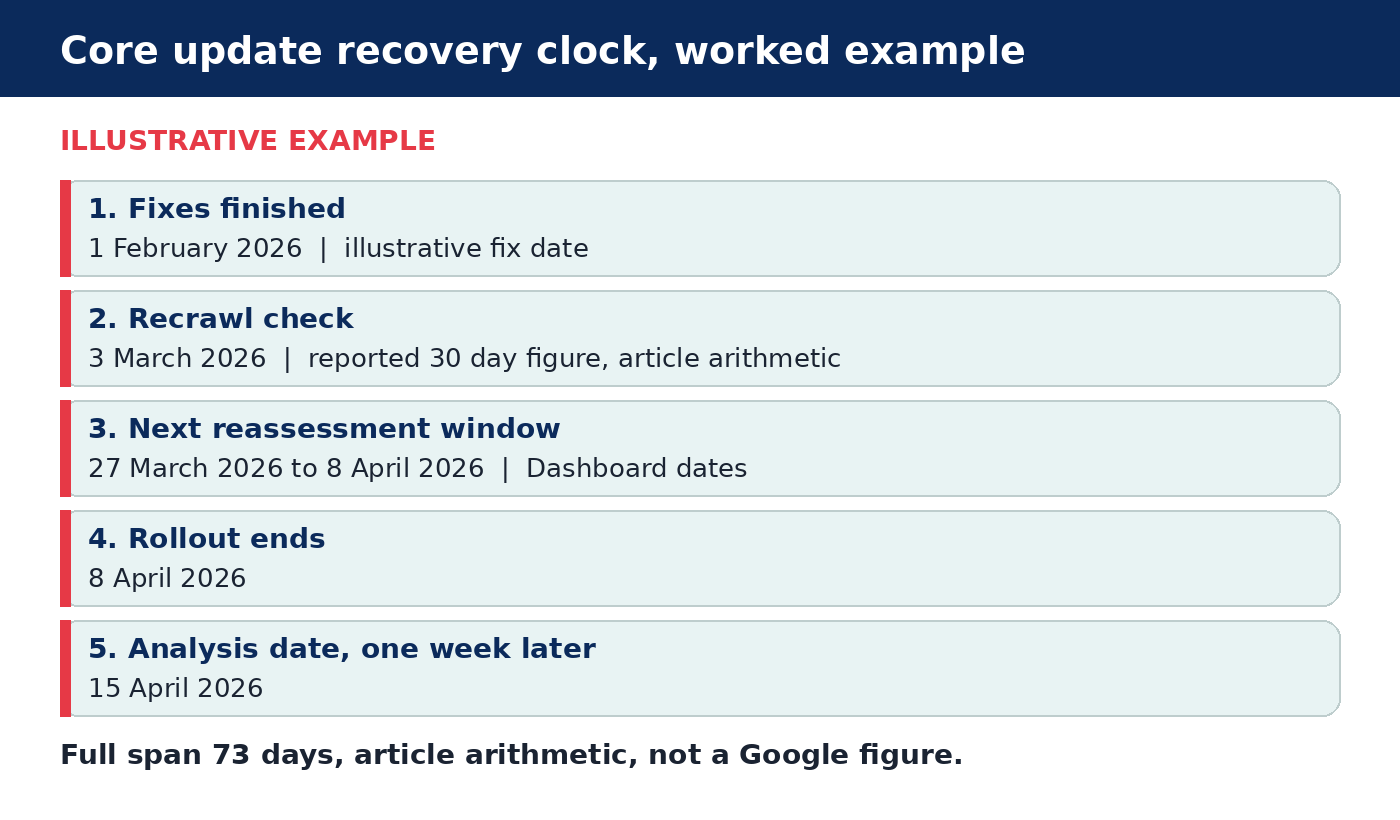
- Fixes finished date. Use the date genuine fixes were finished, not the date traffic fell. This start rule is article method, not a Google attribution.
- Recrawl check. Changed pages must be read again before reassessment. A reported conference figure puts a known URL refresh at about 30 days. No sample size was stated. It is not documentation, and it is not a deadline. Requesting indexing, a sitemap lastmod update, and internal links are levers, not guarantees.
- Next reassessment window. Read the next reassessment window from Dashboard dates. The next major update is the clearest reassessment moment.
- Rollout length. Add the rollout length for that reassessment, from its Dashboard start and end dates.
- Analysis date. Wait at least a full week after the rollout completes before you analyze. That wait rule comes from Google documentation.
ILLUSTRATIVE EXAMPLE. Fixes finished on 1 February 2026. The recrawl check, using the reported 30 day figure as article arithmetic, falls on 3 March 2026.
The March 2026 core update ran from 27 March 2026 to 8 April 2026. The analysis date, one full week after completion, falls on 15 April 2026.
The full span is 73 days, as article arithmetic, not a Google figure.
This example uses an illustrative fix date and real Dashboard dates. It is not a real site, not a real client, and not real Search Console data.
At writing time, the November 2026 core update was still rolling out. It began on 10 November 2026, and no end date was recorded at the Researcher check on 21 November 2026. Re-check Dashboard dates at reading time.
| Step | Your date | Source or check |
|---|---|---|
| Fixes finished | Write your date here | Change log date |
| Recrawl check | Write your date here | Crawl and index checks |
| Next reassessment window | Write your date here | Dashboard start and end dates |
| Rollout ends | Write your date here | Dashboard end date |
| Analysis date, one week later | Write your date here | At least a full week after completion |
The clock starts when fixes are done. Counting from the traffic fall date adds dead time before any fix existed.
How long by severity and page type
Google documentation gives two position examples, with no month range attached to either. A small drop, position 2 to 4, may need no drastic change. A large drop, position 4 to 29, warrants a closer look.
| What happened | Reassessment point | Basis | Next step if no movement |
|---|---|---|---|
| Small slip, 2 to 4 | Next smaller or major update, no drastic change first | Google example, 2 to 4 | Re-check after the wait rule |
| Moderate loss, several weak areas | Next major update, confirmation can take several months | Google large fall, 4 to 29, plus practitioner judgment | Re-diagnose weak areas |
| Severe sitewide loss | Next major update and over months, no fixed date | Google large fall, 4 to 29, plus practitioner judgment | Re-diagnose cause and scope |
| One page type only | Next reassessment after fixed pages are recrawled | Practitioner judgment, not a study | Fix the template once |
| Sitewide loss | Next major update, confirmation takes months | Practitioner judgment, not a study | Re-diagnose sitewide causes first |
| Intent shift | Judge by the new intent, do not wait for the same page | Practitioner judgment, not a study | Build the page type that now ranks |
Find your row, read the basis, and do not read a row without its basis. No per row month range is sourced.
No per row month range is sourced, and none is stated in the table. Practitioner judgment rows state the author view, not a study. Expectation differences by site shape are judgment too, not studied rates.
One template fix can cover many pages at once. A new or small site may be recrawled more slowly than an established site that is crawled often.
How to tell recovery is real: the Search Console comparison
Decide the verdicts before you measure. Set your own decision rules before you start, and write them down. No threshold here is a Google figure.
- Recovered. Impressions, position, and clicks return to the pre drop level you set, and the signal holds across the comparison window.
- Partial. Some metrics return and others do not, and the partial signal holds. Partial is a normal outcome, not a failure.
- Not recovered. No held movement appears on the pages you fixed.
Compare performance with the week before the update began. Use the Last 16 months view.
Compare the last 3 months with the previous period. Add a year over year check for seasonality.
Wait at least a full week after the rollout completes before you analyze. That rule comes from Google documentation on core updates.
A separate line in the debugging drops documentation covers large drops. It says you will likely want to wait a few weeks to analyze the site again. Keep the two rules separate.
Read metrics in order: impressions, average position, clicks, then conversions and revenue. Impressions rising first is an early signal, not yet recovery. Positions and clicks must follow and hold.
Conversions and revenue are your own metrics, with no benchmark stated. A signal must hold across the comparison window before it counts.
The comparison steps below are a summary. The full walkthrough is in B7, Search Console Comparison Reports: Finding Exactly What an Update Took.
- Confirm the rollout finished on the Dashboard, and record start and end dates.
- Wait at least a full week after completion, and allow for data lag of 2 to 3 days.
- Compare equal periods with matched weekdays, using weekly or monthly granularity.
- Use the 16 month view and the year over year check for seasonality.
- Analyze search types separately: Web, Images, Video, and News.
- Sort Pages by Clicks Difference, click into losing pages, and read Queries.
- Split the cases into two groups: clicks down with impressions flat, and impressions down. The first points to a results page pattern. The second points to rankings or demand.
- Respect the one comparison at a time limit. A new comparison filter replaces an existing one. Export your numbers before you switch, as article method, not as a Google instruction.
- Allow for the anonymized query gap. On the query tab, anonymized queries are omitted from the table but included in chart totals, unless a query filter is applied. The table shows a maximum of 1,000 rows.
- Check the Data Anomalies page. It records a Generative AI logging error for 9 to 11 November 2026. The error affected data logging only. It overlaps the 10 November core update start.
- Record updates between core updates. March 2026 spam ended shortly before the March core update began, so the two were adjacent. June, August, and September 2026 spam updates fell between core updates.

Traps that invalidate a reading are reading mid rollout, using unequal periods, mismatching weekdays, and ignoring seasonality. Other traps are reading absolute position instead of impressions and clicks. A further trap is one comparison overwriting another, or a filtered total read as a whole site total.
If any trap applies, redo that step before you set a verdict. A reader chosen 28 day hold window may be used as your own decision rule. Label it as article method, never as a Google method.
| Verdict | What is seen | What to do next |
|---|---|---|
| Recovered | Metrics back to the pre drop level set, held across the window | Keep monitoring, keep the change log going |
| Partial | Some metrics back and others not, held across the window | Continue fixes, do not call it full |
| Not recovered | No held movement on the pages fixed | Re-diagnose by H2-10 |
What can change between major updates
Google documentation records smaller core updates that run continually between major updates. Content improvements can lift a page in position before the next major update arrives, since smaller updates run between them. The documentation changelog records the smaller updates addition under December 2025, in an entry dated December 9.
Some changes can show in days, while site level confirmation takes months. Page level signals can move first, while confirmation for the site as a whole takes longer.
The March 2024 blog post states that the update marked an evolution in how Google identifies helpful content. No single signal or system is used for that judgment.
Core ranking systems work mainly at page level, with some sitewide signals also considered.
A small rise between major updates is consistent with a months long confirmation window. It is a page level or smaller update signal, not yet site level confirmation.
No rise between major updates does not prove failure either. No frequency promise, size promise, or schedule is stated for smaller updates.

Keep doing genuine improvements between major updates, keep the change log, and monitor without cosmetic changes. Do not run cosmetic rewrites, and do not change dates alone to fake freshness.
What to do while you wait, and what not to do
Separate fix now from assess later before you touch anything. Fix now means a confirmed fault that harms the site regardless of the update. Assess later means a judgment call that needs clean data after the rollout ends.
| Fix now | Assess later |
|---|---|
| Outages | Quality judgment |
| Indexing mistakes | Rewrites |
| Security issues | Deletions |
| Tracking breaks | Redirects |
Fix now on the left, assess later on the right. Fix a confirmed fault at once. Hold a judgment call until clean data can be read after the rollout ends.
- Week 1: record. Write down Dashboard dates, freeze judgment calls, and log every change already made.
- Week 2: fix. Finish genuine fixes only, keep the change log current, and monitor without judging.
- Week 3: prepare. Wait for completion plus the full week. Prepare the comparison in H2-6, and hold the verdict until the data can be read fairly.
Tell stakeholders: we will judge after the rollout ends and a full week passes. Site level confirmation can take several months, so no date is promised.
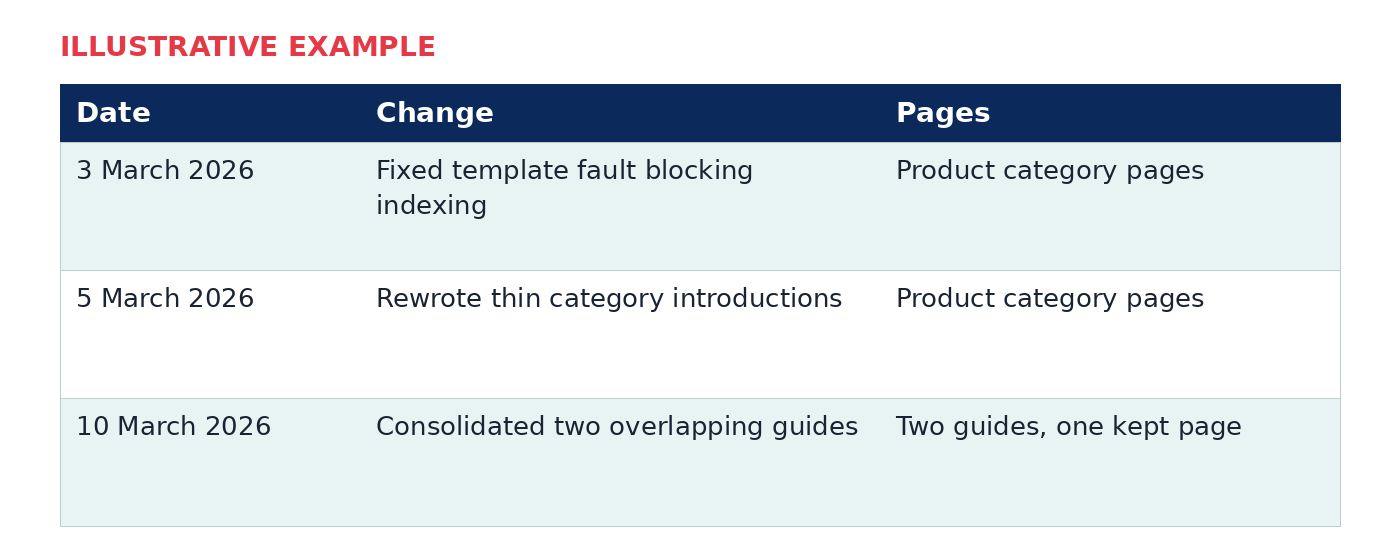
Keep a dated change log: date, change, pages affected, reason. Write one row per change, on the day the change ships. The log below is an illustrative excerpt, not a real site record.
| Date | Change | Pages |
|---|---|---|
| 3 March 2026 | Fixed template fault blocking indexing | Product category pages |
| 5 March 2026 | Rewrote thin category introductions | Product category pages |
| 10 March 2026 | Consolidated two overlapping guides | Two guides, one kept page |
During a rollout, freeze judgment calls and keep change log discipline. Do not analyze mid rollout data as if it were final. Do not change everything at once without a log and a freeze period.
- Quick fixes. Do not chase a quick fix approach, which Google documentation warns against. Do the substantial fix the page needs.
- Fake freshness. Do not change dates alone. A date change with no content change is not an improvement.
- Mass deletion. Do not delete without a per page decision. Use the practitioner labels keep, improve, consolidate, or remove, with link and long tail (less common query) checks. Deletion is a last resort.
- Panic disavow. Do not disavow links after a core update except where a manual action names a link problem. That rule is practitioner advice, not a Google quotation.
- Bought links. Do not buy links as a recovery lever. Link building is not a recovery timeline driver.
- Everything at once. Do not change everything at once without a change log and a freeze period.
- Mid rollout analysis. Do not analyze mid rollout. Wait for completion, then wait at least a full week.
Link building advice conflicts. Some practitioner pages present link building as a recovery lever, while others warn against it during recovery.
No link building timeline is claimed here. No link building step sets the recovery window.
When clicks, rankings, and revenue disagree
Judge success by impressions and clicks together, not by absolute position on its own. A fall in clicks with stable impressions and stable position points to a different problem from a ranking fall. Read the pattern first, then set the verdict.
| Pattern | Verdict | Next step |
|---|---|---|
| Clicks return, revenue does not | Intent mix changed | Check query and page mix, and check conversion pages first |
| Rankings return, clicks do not | Results page pattern | Check impressions, position, title and snippet, and results page features |
| Demand itself fell | Demand fall, not an update effect | Compare year over year, check demand, do not attribute the fall to the update |
Match your pattern to a row, then follow the next step in that row, not in another row.
Clicks returning without revenue means the wrong queries or the wrong pages came back. Check which queries returned, which pages carry them, and whether conversion pages lost their place in the mix.
Rankings returning without clicks means the results page changed around your listing, which the impressions versus clicks split shows first. A demand fall means seasonality or changing interest cut the searches themselves, and the year over year comparison shows it.
Use conversions and revenue as your own metrics, with no benchmark stated. Traffic return alone does not prove recovery. The AI Overview pattern, clicks down with positions held, is a practitioner observation, not a Google statement.
When recovery may not come: the second cycle rule
A full cycle, as article method, means genuine fixes finished and recrawl of the changed pages. It also means at least one major update rollout completed, the full week wait, and a comparison by the H2-6 method.
Genuine fixes mean substantial content, quality, or template fixes, not cosmetic changes and not date changes alone. Cosmetic changes cannot trigger this rule, because they are not genuine fixes.
If a full cycle after genuine, substantial fixes shows no movement, stop and decide. Measure movement on the pages fixed, by the H2-6 method.
Do not repeat the same changes and wait again without a new diagnosis. The honest next steps are re-diagnosis, rebuilding or pivoting the page type, or narrowing scope.

Recomputed gaps between core updates show why no fixed cycle count can be promised. The gap from 29 December 2025 completion to 27 March 2026 start was 87.58 days. The gap from 8 April 2026 completion to 21 May 2026 start was 43.11 days.
The gap from 2 June 2026 completion to 10 November 2026 start was 161.23 days. The gaps are shown individually, with no average and no prediction of the next start date. One gap ran over five months, so a fixed cycle length would mislead the reader.
Some sites do not fully return. No recovery rate study with a sample size and a date was found in this research. No rate is stated here.
Partial recovery, defined in H2-6, is a real outcome. Read it on its own terms, not as a failed full recovery and not as no recovery at all.
- Re-diagnose cause. Check whether the cause was right, with the H2-3 checks rerun on fresh data.
- Re-diagnose intent. Check whether search intent shifted, and whether a different page type now fits the query.
- Rebuild or pivot. Rebuild the page type, or pivot the page to the intent that now ranks, with substantial changes only. Log the rebuild as a new fix date, and start a new clock.
- Narrow scope. Narrow the scope to the pages and queries that can be fixed well. Judge the narrowed set by the same H2-6 method.
FAQ
How long does core update recovery take?
Some changes can show in a few days, while site level confirmation can take several months. A reported range puts typical recovery at 3 to 6 months, and the slowest end at 6 months to 1 year. No sample size stated, it is not documentation or a deadline, and the window depends on fix date, reassessment, and fall size.
Do I have to wait for the next core update to see any recovery?
No, not necessarily. Smaller, unannounced core updates let improved content gain position between major updates, with no frequency or size promise. Major updates remain the clearest reassessment moments, and site level confirmation can still take several months.
How do I know recovery is real and not just noise?
Wait a full week after the rollout completes, and compare equal periods with matched weekdays. Check impressions, position, and clicks in that order, and decide before measuring what will count as recovered, partial, or not recovered. Require the signal to hold across the comparison window, because a one day rise during a rollout does not count.
Want help applying this to your site? Contact Imran Ali to book a free 30-minute meeting.