

Content Architecture Mistakes That Quietly Kill Ecommerce SEO
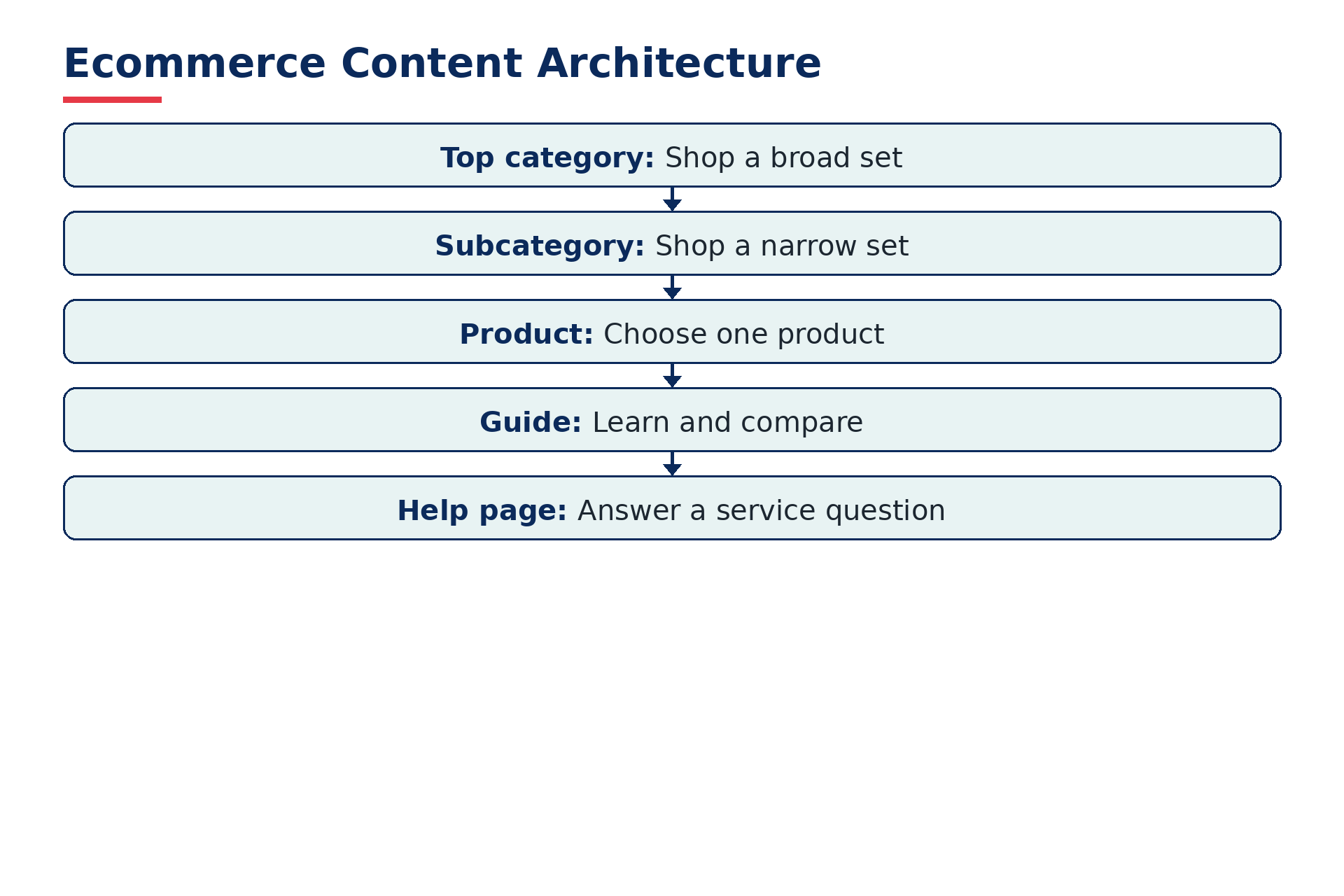

Ecommerce content architecture is the planned map of pages, jobs, and links for one store. Each page has one job, one intent, or one reader need, and a clear next page. Mistakes in the map hide products, split intent across pages, and fill search results with near-identical pages.
A store owner sees the harm when a category page ranks for the wrong query. This article names four mistakes, shows a counted example, and gives audit and measurement steps.
What ecommerce content architecture means, in plain words
A store map lists every page type, the job for each type, and the links that join them. The map covers shopping and learning pages together, so each page serves one clear need.
Google reads the links between pages, called linkages, to work out site structure. URL folders alone do not set importance, because Google reads linkages instead.
A sound map passes a simple test for every page. For each page, check the reader need, the owner intent, and the next page.
A map is not a template, and it is not a list of URLs alone. It is not a pile of blog posts, and folders alone do not make a map.

How category, subcategory, product, filter, guide, and help pages fit together
Six page types carry the whole store, and each type owns one job in the map. The types link in a clear order, from broad sets down to one product choice.
| Page type | Job | Reader question | Next page |
|---|---|---|---|
| Top category | Shop a broad set | What broad set fits | Subcategory |
| Subcategory | Shop a narrow set | What narrow set fits | Product |
| Product | Choose one product | Is this the right one | Parent category |
| Filter view | Shop a narrowed set | What narrowed set fits | Product |
| Guide | Learn and compare | How do I choose | Category or product |
| Help page | Answer service questions | How do returns work | Product or category |
Give every product a link path that starts at a menu and runs through each level above it. Breadcrumbs, or path links, match that route, so readers see where they stand.
A filter view earns its own page only where it serves a distinct need. Where links to all products are not possible, a sitemap list or Merchant Center feed can list them.
Help pages answer returns, delivery, sizing, care, assembly, and warranty questions. Product and category pages link to the help page for each distinct question, and no help page chases a shopping query.
Split only where intent or answer differs, and merge pages that answer one question the same way. The pillar and cluster guide explains the full split and merge test for owner pages.
For guide counts, use the cluster size guide and set no quota here. This page map is a working method, not a rule stated by Google.

Mistake 1: one page tries to do every job, so pages compete with each other
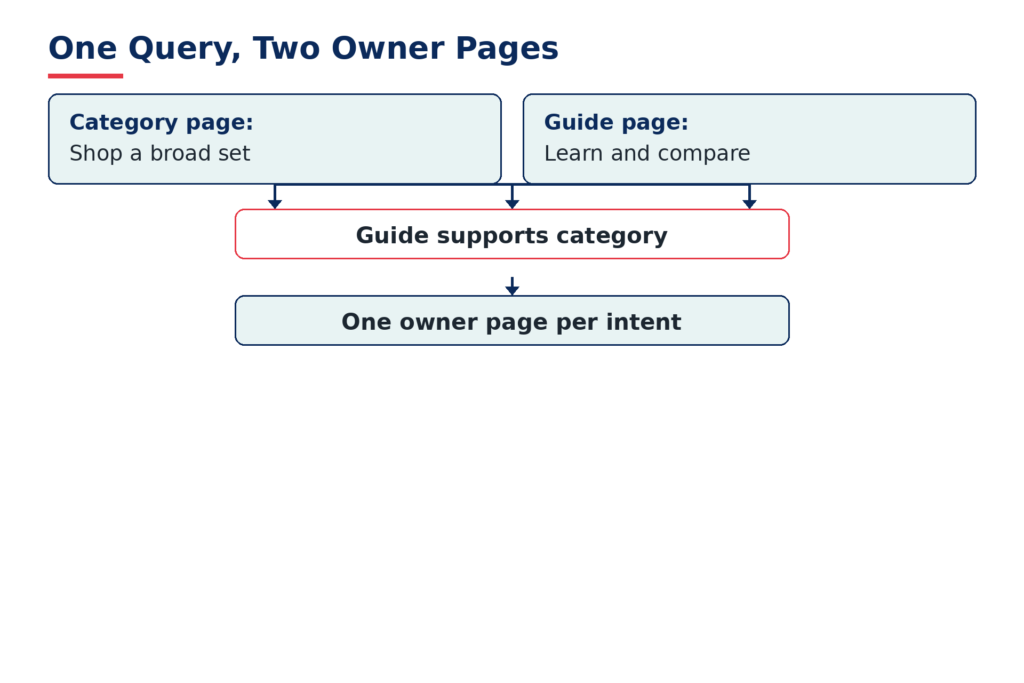
A category page written as a buying guide chases a learning query. A guide page built as a product grid chases a shopping query instead. A product page with a long essay chases the same query.
Cannibalization means two or more pages answer the same need, so search engines must choose between them. When one piece of content lives at more than one address, Google picks one address to show as main.
Three visible signs show pages competing for one intent. Check each sign in the search results and on the page itself before you change any page.
- Category page ranks for learning. A category page ranks for a learning query.
- Rankings swap. Two pages trade places for one query, so neither holds its place.
- Guide outranks category. A guide page outranks the category page it was built to support.
Assign one owner page per intent, merge or rewrite the page without the intent, and relink the guide as support. The pillar and cluster guide sets out the split and merge test in full.
Mistake 2: thin, copied, or duplicated copy on category and product pages
A category page with only a product grid gives shoppers no help in choosing. Generic copy repeated across near-identical categories gives shoppers no reason to trust one category over another.
Manufacturer copy repeats the same description in other stores, with no original detail for shoppers. Write distinct helpful copy for each category, with fit, use, contents, or checkable proof.
Google states it has no preferred word count for a page. No word count proves thin content, and no range fixes a page with no shopper need. Judge copy by whether it helps a choice.
Pagination splits a long list across pages, and each page in the sequence needs its own unique URL. Some content may stay unseen by crawlers when address design is weak. Googlebot may think two URLs return the same content and retrieve only one.
The same page content may be pulled again and again through a different address each time. A crawler may read that growing set of addresses as a site with endless pages and no last page.
Pages 2 and 3 repeat the intro copy from page 1, and sort choices reorder the same set. Product variants, or versions that differ by color or size, can carry near-identical text on separate URLs. Vary or shorten repeated intro copy, and treat it as a reader check, not as a Google rule.
Let every page in the sequence name itself in its canonical tag, and do not send later pages back to page 1. For variants marked only by optional query parameters, the canonical URL drops those parameters.
For each indexable page, use one address form in links, in the sitemap file, and in its canonical tag. A category with no items inside it needs a noindex robots meta tag.
The site finds such a category empty and automatically drops it from on-site search and browse. In that case, think about sending a 404 status code back for the page.

Mistake 3: filters and facets left to multiply, until the index fills with near-identical pages
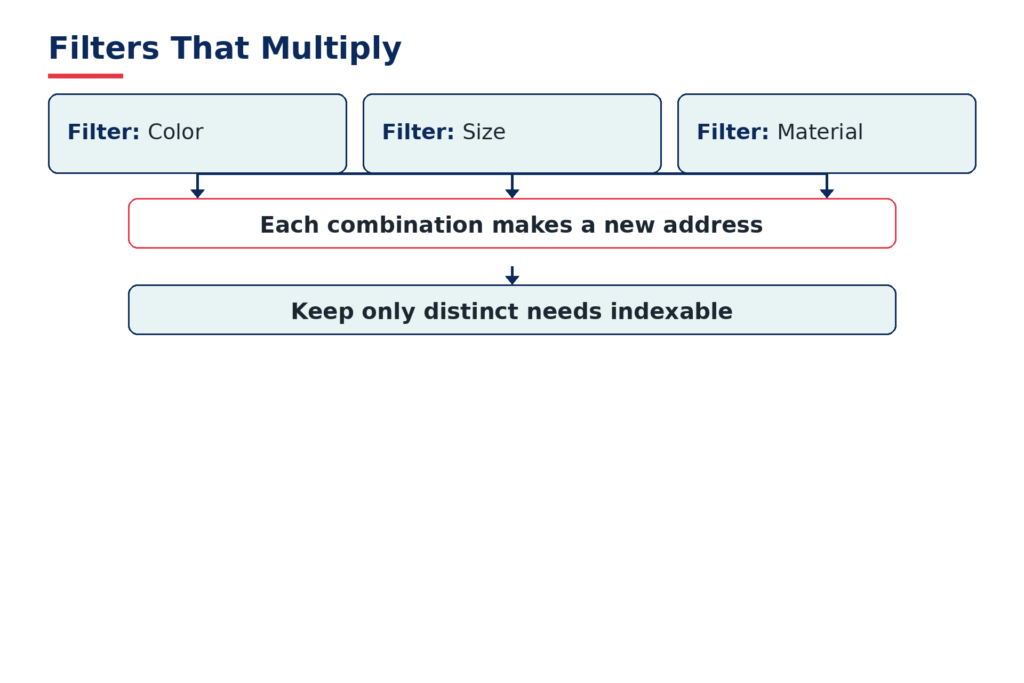
Filters, or choices that narrow a product list, can each create a new address for the same set. Faceted navigation is that filter system, and each combination of choices can create one more address.
Combinations multiply fast, and crawlers, or software that reads web pages, spend effort on near-identical sets. Google names overcrawling and slower discovery crawls as harms from endless faceted URL spaces.
A filtered view earns an indexable page only where it serves a distinct search need. It must also hold enough distinct products and helpful copy to help a shopper choose.
Canonical tags, noindex tags, and crawl control do different jobs, and they are not interchangeable. A canonical tag names the main URL for a set of near-identical pages.
For faceted URLs that need no indexing, Google notes canonical and nofollow work less well in the long term. Nofollow is a link value that tells Google not to follow a link.
Where faceted URLs need no indexing, use robots.txt or fragments to keep filter choices out of indexed URLs. In path URLs, use one fixed sequence for filters, and never list one filter twice.
Use a 404 for nonsense combinations, missing pagination URLs, repeated filters, and empty result sets. Use an ampersand (&) separator in filter URLs, and do not repeat the same filter in one URL.
A noindex tag asks Google not to keep a page in results, but Google must fetch the page to see it. Never combine a robots block with noindex on the same URLs, because the block can hide the tag. Do not write noindex rules in robots.txt, because Google does not support that form.
Do not block every filtered URL at once without checking shopper paths. Do not let sort and display choices create links Google can follow and read, and keep those choices out of indexed URLs.
| Control | What it does | When to use it | Limit |
|---|---|---|---|
| Canonical tag | Names the main URL | Near-identical pages | Less effective over the long term for facets |
| Noindex tag | Asks for no search listing | Page must stay live, not listed | Needs Google to read it first |
| Robots block | Stops Google reading paths | Faceted URLs need no indexing | Can hide a noindex tag |
| URL fragments | Holds filter choices in the page part | Filters need no indexed URL | Fragment is ignored for indexing |
Mistake 4: weak internal linking, orphan pages, deep pages, and no topical map
Priority categories and best-selling products get few links, while low-value pages collect menu and footer links. Automated blocks add links to the same low-value pages, so counts point away from priority pages.
Google may judge how important a page is from how many links point to it and how hard it is to reach. In general, a page linked from many other pages counts as more important inside its own site.
An orphan page is a live page with no internal link pointing to it. Guides and products added outside the map often become orphans, and near orphans have only one weak link.
Deep pages sit many clicks from the home page, reached only through search or long link chains. The three-click idea is a practitioner working rule, not a Google rule. URL folders alone do not determine importance, because Google generally reads linkages between pages instead.
Without a topical map, pages are added when new, by menu position, or on a tool suggestion, with no owner per subtopic. A topical map records coverage, gaps, and overlaps for one subject.
The internal linking guide gives the full method for link placement and orphan fixes. The topical authority guide explains why coverage and structure matter together for one subject.

How to audit your own architecture, step by step
An audit lists every page, assigns one type and intent, and records incoming links and click depth. It then flags overlaps, thin pages, filter URLs, orphans, and deep pages, and ranks fixes by harm. Use the sitemap list, site search, and editor search, and check links page by page.
The Search Console Links report shows a sample of links, not every link on the site. Tables in the report are limited to 1,000 rows, so use the report for top pages only. Use the URL Inspection tool for top pages, and record each result.
Write a full decision log before any fix, with one row per problem found. Each row names the page, the mistake, the evidence seen, the fix chosen, and the owner.
Each guide and help page must name its owner intent and its next page, or be merged or relinked. For a traffic drop audit, use the traffic drop audit guide for the freeze, or pause on changes, and the evidence log.
For orphan fixes found in this audit, follow the internal linking guide. Fix no page before the log is written, and change one thing at a time.

Worked example with counted pages, before and after (Illustrative)
This worked example is ILLUSTRATIVE, with a fictional store and no result claimed. The map holds 4 top categories and 10 subcategories in total. The same counts are used throughout this section.
The map holds 36 products and 2 indexable filter pages. It also holds 5 buying guides and 3 help pages. Together, the six groups total 60 content pages.
The home page brings the total to 61 pages in this example. Use the cluster size guide for cluster size counting; set no quota here.
Before the fix, categories overlapped, and more than one answered the same shopping need. Two guides sat as orphans, and 3 products sat deep in the map, reached only through long chains. Many filtered addresses filled search results with near-identical sets, with no total claimed for them.
After the fix, the same 61-page map stays, with merged categories and linked guides. The map keeps 2 indexable filter pages, holds no orphan page, and links the 3 deep products close to the home page.
| Page type | Count | Job | Links |
|---|---|---|---|
| Home page | 1 | Start the map | All top categories |
| Top categories | 4 | Shop broad sets | Subcategories |
| Subcategories | 10 | Shop narrow sets | Products |
| Products | 36 | Choose one product | Parent category |
| Indexable filter pages | 2 | Shop narrowed sets | Products |
| Buying guides | 5 | Learn and compare | Category or product |
| Help pages | 3 | Answer service questions | Product or category |
| Total in map | 61 | All jobs above | All types above |

Fixes in order of harm: what to do first, next, and last
Fix in harm order, not ease order, so the most harmful problem is removed first. This order is a working method, not a rule stated by Google.
First, stop indexing and crawl harm from filter and duplicate pages, with canonical, noindex, or crawl control used alone. Hold copy and links steady, so the fix is judged alone.
Second, assign owner pages for each intent, and merge or rewrite all the pages that compete for one query. Keep URLs and templates unchanged, so only the merge is judged.
Third, repair thin category and product copy on priority pages only, with original helpful copy. Pause new pages while copy is repaired, so only copy changes are judged.
Fourth, relink orphan and deep priority pages from the parent categories and the guides that serve them. Hold category structure steady while links change, so link changes are judged alone.
Fifth, add missing guide and help pages only where a distinct intent has no owner page. Change nothing else while new pages are added, so only their effect is judged.
Do not rewrite the catalog, change URLs or templates first, or add pages to a broken map. Where a store is recovering after a core update, a ranking change, use the ecommerce recovery guide for the recovery method. The traffic drop audit guide covers the freeze, or pause on changes, and the evidence log, and this article goes no further.
How to measure a fix, and mistakes to avoid when fixing
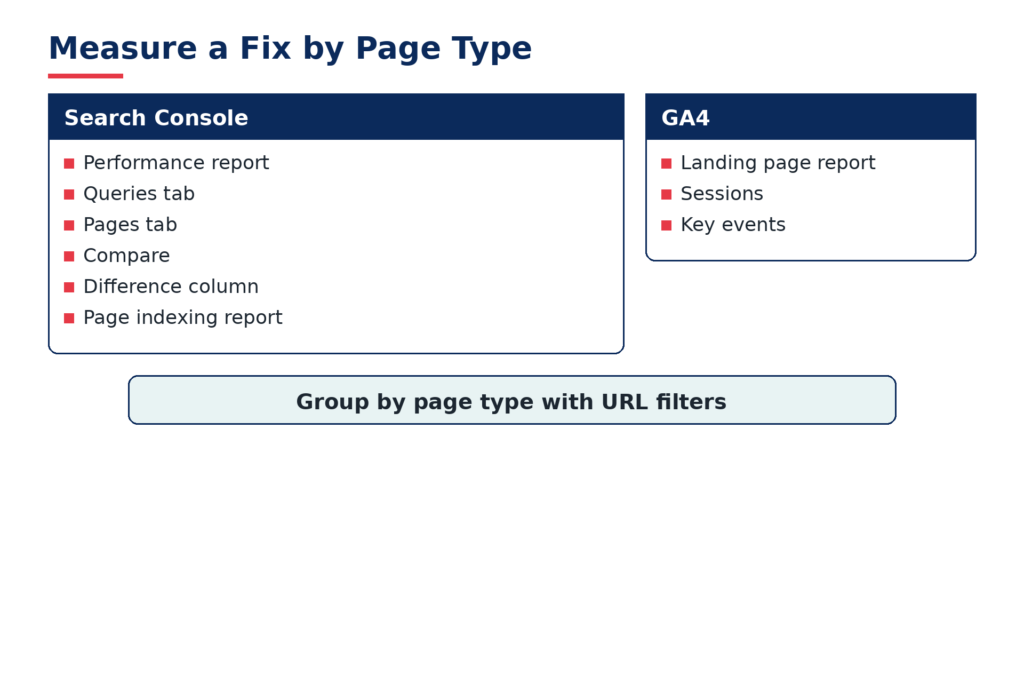
In Search Console, read the Performance report filtered by page type, with clicks and impressions for each type. Impressions are times a page was shown in search results.
Use the Queries tab for one query, and the Pages tab for one page. Use Compare for matched periods of the same length, read the Difference column, and run only one comparison at a time.
Use the Page indexing report for filtered and paginated URLs, and check kept pages against duplicate pages. Example lists in the report are limited to 1,000 items, so use URL Inspection for one specific page.
In GA4, or Google Analytics 4, read the Landing page report, which shows the first page in a visit, or session. Group rows by page type with URL filters, as a reader method, not a built-in feature. Read sessions, or visits, and key events, or chosen actions, together, and do not count them as clicks.
Record a dated baseline before a change, and check again after a recorded wait. The wait is a working method choice, not a Google rule, and no recovery is promised for any fix.
| Mistake | Harm | Safer step |
|---|---|---|
| Fix every page at once | No single cause can be judged | Change one thing at a time |
| Change URLs with no redirect plan | Old path is lost | Plan redirects before URL changes |
| Block and noindex the same URLs | The block can hide the noindex tag | Choose one control per URL set |
| Copy a rival page count or stock limit unchecked | Demand and stock may not match | Check demand and stock first |
| Judge on one day or one query | One day proves no pattern | Use matched periods and more queries |
FAQ: Frequently asked questions
What is ecommerce content architecture?
Ecommerce content architecture is the planned map of pages, jobs, and links for one store. Each page has one job, one intent, or one reader need, and a clear next page.
How many category levels should an ecommerce store have?
No fixed level count works as a Google rule for every store. Use the page map and the three-click working rule to keep priority pages close to the home page. URL folders alone do not set importance, because Google reads the linkages between pages.
Should filtered category pages be indexed?
Some filtered pages earn a place in search results. Keep a filtered page indexable only where it serves a distinct search need with distinct products and helpful copy. Use canonical, noindex, or crawl control alone for each case, never a robots block with noindex on the same URLs.
Want help applying this to your site? Contact Imran Ali to book a free 30-minute meeting.